Minggu, Mei 02, 2010

On 29 April 2010 was at 10.4 or ubuntu release tenarnya name Lucid Lynx, who many features offered as additional features, who I like is the view bootscreennya who become citizens of purple not brown anymore. On the desktop wallpaper is also no option like windows aero which could walpapernya alternate view.

Lucid Lynx on Ubuntu-based desktop, we are provided with access when it would make the turn when we need a repository for updates / install packages.

To select a repository is recommended for use there in the local repository (Indonesia) Indonesian people for our course, and the existing software ubuntu repository sources list Indonesia, who I currently use is a repository of kambing.ui.ac.id / ubuntu.

Vicarious step, select the System-Administration-Software Sources to display showing the following:

Then select the part softawe ubuntu-Download from his bow at the click until the option appears, select Other and search for Indonesia-kambing.ui.ac.id territory, such as the following picture:

Then choose the server and load, wait until the process is complete, and there we are using the Repository of kambing.ui.ac.id


Senin, Maret 29, 2010

Qmmp Player : Open Source Multimedia Player


Qmmp is Multimedia player like Winamp in windows or xmms in linux, this player supported much plugins winamp, for now stable version lauched 0.3.3.


Qmmp support Winamp and xmms skins, plugin, MPEG1 layer 1/2/3. Ogg Vorbis, FLAC, Musepack, WavePack, ModPlug, WMA Support, format from FFmpeg library, PCM Wave, AAC, CD Audio, CUE Sheet, WavPack emmbeded CUE, ALSA Sound, Jack Sound, OSS Sound, PulseAudio, last.fm/Libre.fm, Spectrum Analyzer, ProjectIM, Konversi Sample rate, efek bs2b dsp, streaming, removable device detection via HAL, MPRIS, global hotkey, playback video with MPlayer.

How to install on Ubuntu? like another application supported Ubuntu. Just Run : apt-get install qmmp at console, installation run n wait until finish.

To play go to Application -- Sound and Video -- qmmp

yihaa... interface like winamp show.. lets play your audio.

Sabtu, Maret 27, 2010

Install Cairo dock on Ubuntu Lucid Lynx

Cairo-Dock is an animated application launch bar for the desktop, comparable to the dock in Mac OS X or Rocket Dock (for Windows). Now, you can use Cairo-Dock with OpenGL.

In previus version we have to add another repository to install Cairo-Dock, but with Ubuntu Lucid Lynx we just go simple install.
First we check the availability Cairo-Dock with this command : apt-cache search cairo-dock, an the result like this :
lucid@lucid-laptop:~$ apt-cache search cairo-dock
cairo-dock - A light and eye-candy dock to launch your programs (metapackage)
cairo-dock-core - A light and eye-candy dock to launch your programs (core package)
cairo-dock-data - A light and eye-candy dock to launch your programs (common files)
cairo-dock-dev - A light and eye-candy dock to launch your programs (dev package)
cairo-dock-plug-ins - A set of plug-ins for cairo-dock
cairo-dock-plug-ins-data - Common files for cairo-dock-plug-ins
cairo-dock-plug-ins-integration - Two plug-ins for cairo-dock for a better integration in GNOME or Xfce
docky - Elegant, powerful, clean dock
python-docky - Elegant, powerful, clean dock - Python support library,

Thereis cairo-dock appear, next just run : aptitude install cairo-dock, the Cairo Dock will be installed on your ubuntu with it depedencies. After finished we can run this application with choose : Application --Accessories--GLX-Dock. To make Cairo Dock Auto run on startup, just go to System--Preferences--Startup Application, then add launcher for Cairo Dock.

For more information you can see the video from youtube.

Jumat, Maret 26, 2010

Tasksel For Simple Installation

Tasksel is an installation system that is an integral part of the Debian installer (it is also included in Ubuntu). Tasksel groups software packages by tasks and offers an easy way to install all the packages needed for that task. It provides the same functionality as using conventional meta-packages.

Tasks List

Tasks are defined in .desc files found in /usr/share/tasksel. Debian derivatives can easily add tasks.

The default list available in Ubuntu can be viewed with this command-line:

gedit /usr/share/tasksel/ubuntu-tasks.desc

Installation

tasksel has been included as part of the base installation since Ubuntu 6.10 (Edgy). Tasksel is present on all versions of Ubuntu's installer (but previously was not installed as part of the base system).

Usage

To run tasksel from the command line, type:

sudo tasksel

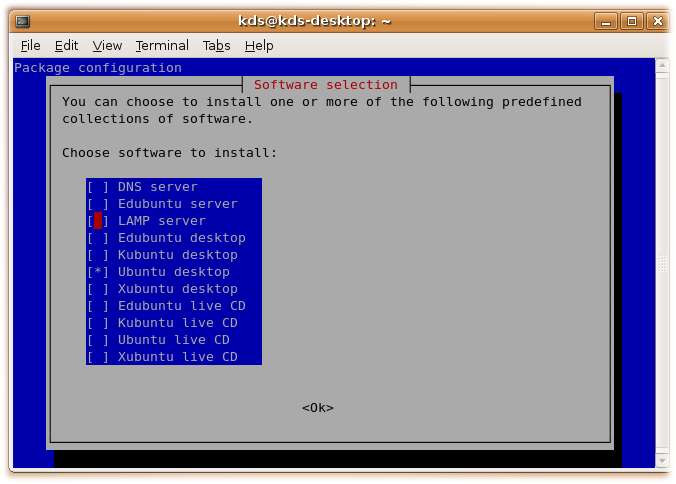
the tasksel menu will be shown:
tasksel.jpg

Already-installed tasks will have an asterisk beside their name. Select a task by scrolling down and pressing space. This will put an asterisk beside the selected task and mark it for installation. Removing an asterisk marks the task for removal. Once "ok" is selected the task installations and/or removals will take place using apt-get.

Command line arguments

You can also directly specify which task to install.

For instance, to add the Apache-MySQL-PHP stack to an existing system:

sudo tasksel install lamp-server

For complete options, see the tasksel manpage:

man tasksel

Usage (alternative)

NOTE - Calling tasks from apt-get is not documented anywhere. If you find a page that documents this, please update this page with a link.

One can alternatively install tasks with apt-get. This is the syntax:

sudo apt-get install the_name_of_the_task_you_want^

And yes, you forgot the caret (^), and yes, it is magical.

Examples:

sudo apt-get install ubuntu-desktop^ sudo apt-get install kubuntu-desktop^ sudo apt-get install lamp-server^

Task descriptions

Here are the long descriptions of a few common tasks:

  • dns-server

Selects the BIND DNS server and its documentation.

  • edubuntu-server

This task provides the Edubuntu classroom server.

  • lamp-server

Selects a ready-made Linux/Apache/MySQL/PHP server.

  • ubuntu-desktop

This task installs the Ubuntu desktop environment.

  • ubuntu-live

This task provides the extra packages installed on the Ubuntu LiveCD. It is neither useful nor recommended to install this task in other environments.

source : https://help.ubuntu.com/community/Tasksel