Tasksel is an installation system that is an integral part of the Debian installer (it is also included in Ubuntu). Tasksel groups software packages by tasks and offers an easy way to install all the packages needed for that task. It provides the same functionality as using conventional meta-packages. Tasks are defined in .desc files found in /usr/share/tasksel. Debian derivatives can easily add tasks. The default list available in Ubuntu can be viewed with this command-line: tasksel has been included as part of the base installation since Ubuntu 6.10 (Edgy). Tasksel is present on all versions of Ubuntu's installer (but previously was not installed as part of the base system). To run tasksel from the command line, type: the tasksel menu will be shown: Already-installed tasks will have an asterisk beside their name. Select a task by scrolling down and pressing space. This will put an asterisk beside the selected task and mark it for installation. Removing an asterisk marks the task for removal. Once "ok" is selected the task installations and/or removals will take place using apt-get. You can also directly specify which task to install. For instance, to add the Apache-MySQL-PHP stack to an existing system: For complete options, see the tasksel manpage: NOTE - Calling tasks from apt-get is not documented anywhere. If you find a page that documents this, please update this page with a link. One can alternatively install tasks with apt-get. This is the syntax: And yes, you forgot the caret (^), and yes, it is magical. Examples: Here are the long descriptions of a few common tasks: Selects the BIND DNS server and its documentation. This task provides the Edubuntu classroom server. Selects a ready-made Linux/Apache/MySQL/PHP server. This task installs the Ubuntu desktop environment. This task provides the extra packages installed on the Ubuntu LiveCD. It is neither useful nor recommended to install this task in other environments.Tasks List
gedit /usr/share/tasksel/ubuntu-tasks.desc
Installation
Usage
sudo tasksel
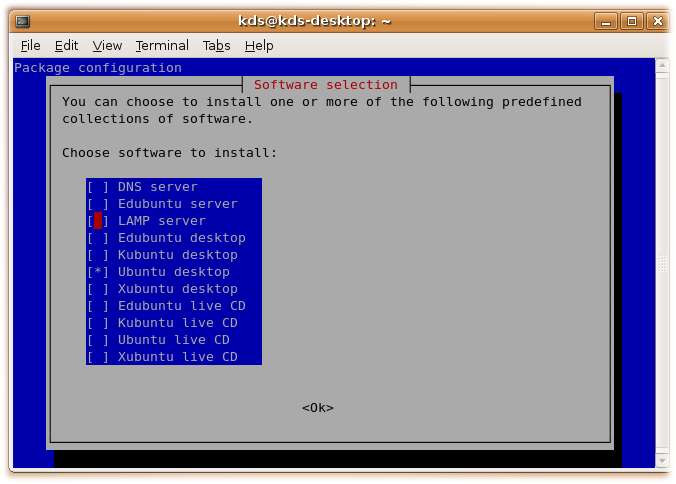
Command line arguments
sudo tasksel install lamp-server
man tasksel
Usage (alternative)
sudo apt-get install the_name_of_the_task_you_want^
sudo apt-get install ubuntu-desktop^ sudo apt-get install kubuntu-desktop^ sudo apt-get install lamp-server^
Task descriptions
Jumat, Maret 26, 2010
Tasksel For Simple Installation
Minggu, Februari 28, 2010
Debian Packages Cycle : Package maintenance
Each Debian software package has a maintainer who keeps track of releases by the "upstream" authors of the software and ensures that the package is compliant with Debian Policy, coheres with the rest of the distribution, and meets the standards of quality of Debian. In relations with users and other developers, the maintainer uses the bug tracking system to follow up on bug reports and fix bugs. Typically, there is only one maintainer for a single package, but increasingly small teams of developers "co-maintain" larger and more complex packages and groups of packages.[41] Periodically, a package maintainer makes a release of a package by uploading it to the "incoming" directory of the Debian package archive (or an "upload queue" which periodically batch-transmits packages to the incoming directory). Package uploads are automatically processed to ensure that they are well-formed (all the requisite files are in place) and that the package is digitally signed by a Debian developer usingOpenPGP-compatible software. All Debian developers have public keys.[42] Packages are signed to be able to reject uploads from hostile outsiders to the project, and to permit accountability in the event that a package contains a serious bug, a violation of policy, or malicious code. If the package in incoming is found to be validly signed and well-formed, it is installed into the archive into an area called the "pool" and distributed every day to hundreds of mirrors worldwide. Initially, all package uploads accepted into the archive are only available in the "unstable" suite of packages, which contains the most up-to-date version of each package. However, new code is also untried code, and those packages are only distributed with clear disclaimers. For packages to become candidates for the next "stable" release of the Debian distribution, they first need to be included in the "testing" suite. The requirements for a package to be included in "testing" is that it:[43][44] Thus, a release-critical bug in a package on which many packages depend, such as a shared library, may prevent many packages from entering the "testing" area, because that library is considered deficient. Periodically, the Release Manager publishes guidelines to the developers in order to ready the release, and in accordance with them eventually decides to make a release. This occurs when all important software is reasonably up-to-date in the release-candidate suite for all architectures for which a release is planned, and when any other goals set by the Release Manager have been met. At that time, all packages in the release-candidate suite ("testing") become part of the released suite ("stable"). It is possible for a package – particularly an old, stable, and seldom-updated one – to belong to more than one suite at the same time. The suites are simply collections of pointers into the package "pool" mentioned above. The Debian Project, being free software, handles security policy through public disclosure rather than through security through obscurity. Many advisories are coordinated with other free software vendors and are published the same day a vulnerability is made public. Debian has a security audit team that reviews the archive looking for new or unfixed security bugs. Debian also participates in security standardization efforts: the Debian security advisories are compatible with the Common Vulnerabilities and Exposures (CVE) dictionary, and Debian is represented in the Board of the Open Vulnerability and Assessment Language (OVAL) project.[45] The Debian Project offers extensive documentation and tools to harden a Debian installation both manually and automatically.[46] SELinux(Security-Enhanced Linux) packages are installed by default though not enabled.[47] Source : wikipedia.org
[edit]Security information and policy
Minggu, Februari 14, 2010
Bootloader Karmic Koala with Grub2
Today I have finished installing karmic koala, at menu loader many option to log in, and than I thing to remove some loader.
First I go to : /boot/grub/menu.lst , but viola... i cant that at my karmic koala. after googling I can find the problem, the last version of ubuntu use Grub v1 and for ubuntu karmic koala user Grub v2.
what is basicly different between Grub v1 and Grub v2?
menu.lst no longer controls the menu.
- 'grub.cfg` is now in control of the menu.
grub.cfg is automatically generated by one of the GRUB 2 scripts.
- The partition numbering is different.
Stanzas are phrased slightly differently and can't be copied directly from a GRUB 1 menu.lst to grub.cfg. They are pretty close and easy to change, though.
### BEGIN /etc/grub.d/10_linux ###and change to :
menuentry "Ubuntu, Linux 2.6.31-19-generic" {
recordfail=1
if [ -n ${have_grubenv} ]; then save_env recordfail; fi
set quiet=1
insmod ext2
set root=(hd0,10)
search --no-floppy --fs-uuid --set fa5dfed6-faa4-43b5-b0a9-6b3f623706f9
linux /boot/vmlinuz-2.6.31-19-generic root=UUID=fa5dfed6-faa4-43b5-b0a9-6b3f623706f9 ro quiet splash
initrd /boot/initrd.img-2.6.31-19-generic
}
menuentry "Ubuntu, Linux 2.6.31-19-generic (recovery mode)" {
recordfail=1
if [ -n ${have_grubenv} ]; then save_env recordfail; fi
insmod ext2
set root=(hd0,10)
search --no-floppy --fs-uuid --set fa5dfed6-faa4-43b5-b0a9-6b3f623706f9
linux /boot/vmlinuz-2.6.31-19-generic root=UUID=fa5dfed6-faa4-43b5-b0a9-6b3f623706f9 ro single
initrd /boot/initrd.img-2.6.31-19-generic
}
menuentry "Ubuntu, Linux 2.6.31-14-generic" {
recordfail=1
if [ -n ${have_grubenv} ]; then save_env recordfail; fi
set quiet=1
insmod ext2
set root=(hd0,10)
search --no-floppy --fs-uuid --set fa5dfed6-faa4-43b5-b0a9-6b3f623706f9
linux /boot/vmlinuz-2.6.31-14-generic root=UUID=fa5dfed6-faa4-43b5-b0a9-6b3f623706f9 ro quiet splash
initrd /boot/initrd.img-2.6.31-14-generic
}
menuentry "Ubuntu, Linux 2.6.31-14-generic (recovery mode)" {
recordfail=1
if [ -n ${have_grubenv} ]; then save_env recordfail; fi
insmod ext2
set root=(hd0,10)
search --no-floppy --fs-uuid --set fa5dfed6-faa4-43b5-b0a9-6b3f623706f9
linux /boot/vmlinuz-2.6.31-14-generic root=UUID=fa5dfed6-faa4-43b5-b0a9-6b3f623706f9 ro single
initrd /boot/initrd.img-2.6.31-14-generic
}
## END /etc/grub.d/10_linux ###
### BEGIN /etc/grub.d/10_linux ###After do that we can reboot our Ubuntu and just look different view while boot loader menu shown.
menuentry "Ubuntu, Linux 2.6.31-19-generic" {
recordfail=1
if [ -n ${have_grubenv} ]; then save_env recordfail; fi
set quiet=1
insmod ext2
set root=(hd0,10)
search --no-floppy --fs-uuid --set fa5dfed6-faa4-43b5-b0a9-6b3f623706f9
linux /boot/vmlinuz-2.6.31-19-generic root=UUID=fa5dfed6-faa4-43b5-b0a9-6b3f623706f9 ro quiet splash
initrd /boot/initrd.img-2.6.31-19-generic
}
menuentry "Ubuntu, Linux 2.6.31-19-generic (recovery mode)" {
recordfail=1
if [ -n ${have_grubenv} ]; then save_env recordfail; fi
insmod ext2
set root=(hd0,10)
search --no-floppy --fs-uuid --set fa5dfed6-faa4-43b5-b0a9-6b3f623706f9
linux /boot/vmlinuz-2.6.31-19-generic root=UUID=fa5dfed6-faa4-43b5-b0a9-6b3f623706f9 ro single
initrd /boot/initrd.img-2.6.31-19-generic
}
## END /etc/grub.d/10_linux ###
Kamis, Januari 14, 2010
Squid 3.0 On Debian Lenny
http_port 192.168.1.1:3128 transparenticp_port 3130acl youtube dstdomain .youtube.comno_cache allow youtubehierarchy_stoplist cgi-bin ? localhost .js .jsp .friendster.comacl QUERY urlpath_regex cgi-bin \? localhost .friendster.comno_cache deny QUERYcache_replacement_policy heap LFUDAmemory_replacement_policy heap GDSFcache_mem 6 MBcache_dir diskd cache0 12000 28 256cache_dir diskd cache1 12000 28 256cache_swap_low 98cache_swap_high 99cache_access_log /var/log/squid/access.logcache_log /var/log/squid/cache.logcache_store_log /var/log/squid/store.logmime_table /usr/share/squid/mime.confpid_filename /var/run/squid.pidclient_netmask 255.255.255.0refresh_pattern ^ftp: 10080 95% 241920 reload-into-ims override-lastmodrefresh_pattern . 180 95% 120960 reload-into-ims override-lastmodredirect_rewrites_host_header offacl all src 0.0.0.0/0.0.0.0acl manager proto cache_objectacl localnet src 192.168.1.0/255.255.255.0acl localhost src 127.0.0.1/255.255.255.255acl SSL_ports port 443 8443 563 777acl Safe_ports port 25 80 81 110 443 563 6667 7000 777 210 119 70 21 1025-65535acl Safe_ports port 280 6668 6669acl Safe_ports port 488acl Safe_ports port 591acl Safe_ports port 777always_direct deny allacl CONNECT method CONNECThttp_access allow manager localhosthttp_access deny managerhttp_access allow localnethttp_access allow localhosthttp_access deny !Safe_portshttp_access deny CONNECT !SSL_portshttp_access deny CONNECT#httpd_accel_host virtual#httpd_accel_port 80#httpd_accel_with_proxy on#httpd_accel_uses_host_header onhttp_access deny allmaximum_object_size 128 MBmaximum_object_size_in_memory 8 KBipcache_size 4096ipcache_low 98ipcache_high 99quick_abort_min 0quick_abort_max 0quick_abort_pct 75fqdncache_size 4096shutdown_lifetime 10 secondscache_mgr squidku@yahoo.comcache_effective_user proxycache_effective_group proxymemory_pools offbuffered_logs offlog_icp_queries offlogfile_rotate 1log_fqdn offforwarded_for officp_hit_stale onquery_icmp onreload_into_ims onemulate_httpd_log offnegative_ttl 2 minutespipeline_prefetch onvary_ignore_expire onhalf_closed_clients offhigh_page_fault_warning 2nonhierarchical_direct onprefer_direct offvisible_hostname squidku.net.idunique_hostname squidku.net.id